Select Page

4 similar questions about backgrounds

 | 

Tagged: 

  • Creator
    Topic  | 
  • #95576 Reply | Report | Quote

    The Complete Guide To Product Photography – Backgrounds

    ***

    My Setup:
    —-
    Camera: Fujifilm X-T3 • 35 mm F/2 (I know, it’s not a macro)
    Photos settings: F/16 • 1/250 • ISO 160
    Lighting: Yongnuo speedlight with Magmod grid and diffuser
    Surface: Tinted glass
    Subject: Teapot which have a similar size to the lens used by Alex in its video
    —-
    Ceiling height: around 8 ft
    Distance of the subject from the back wall: 5 ft
    Distance of the subject from the floor: 51 in (lowest I can be with my lightstand)

    ***

    My Questions:
    I’m halfway through the video about backgrounds and I have so much problems/questions already. I guess it’s better to clarify these subjects before going further.

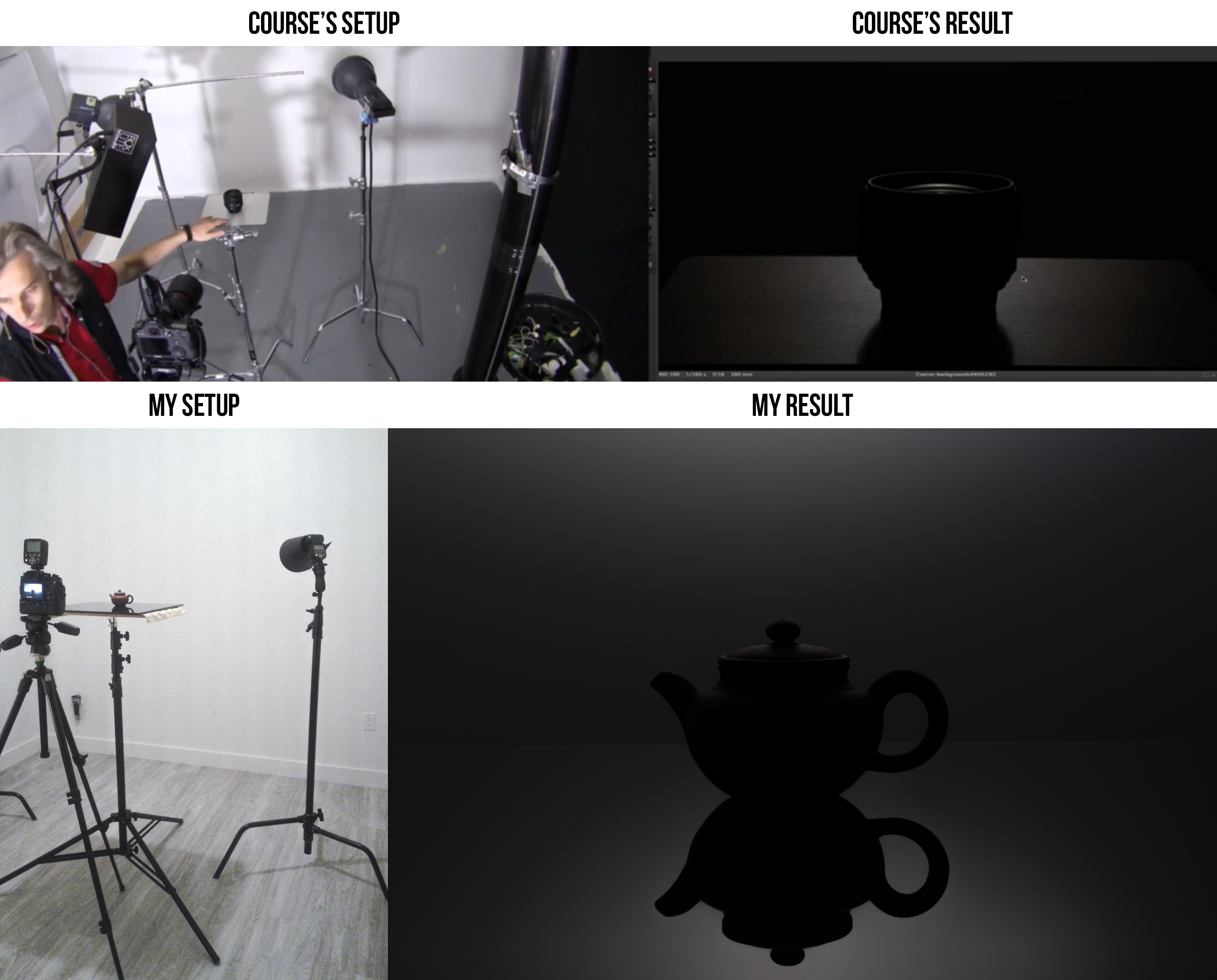
    1.How to create a silhouette without getting any light on the table (see 1_Silhouette.jpeg image)?
    My subject always seems to get light from the top. I tried to add a piece of black cardboard around my light (featured in the image) but it changes nothing. Also, no matter how high (or low) my light is, I see the reflection on the table. Can my ceiling be too low for product photography? Both of my lightstand are at their lowest position.
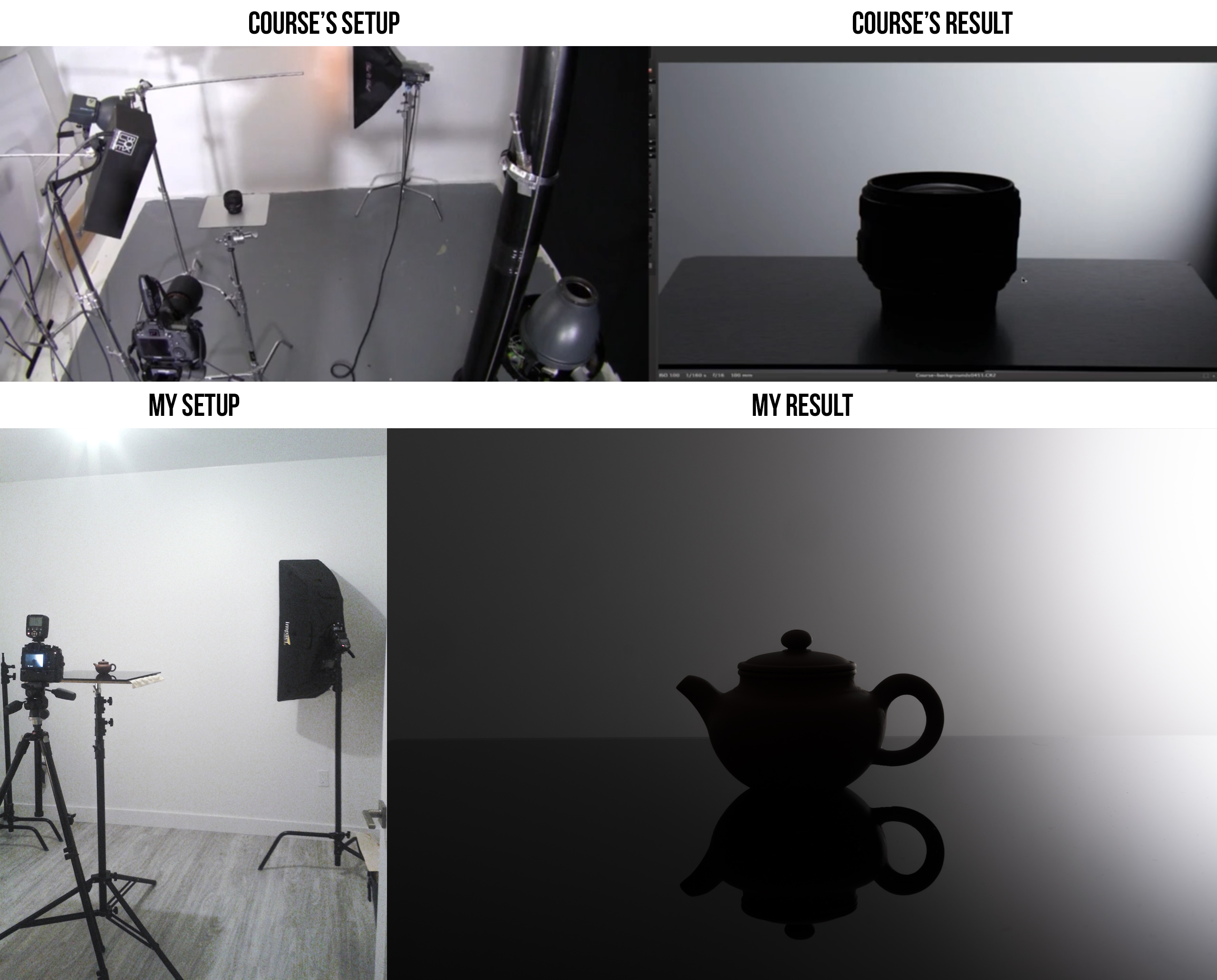
    2. How to create a reflection on the table while keeping a black background (see 2_Table_Only.jpeg image)?
    The more the speedlight goes up, the more light I have on the table. I didn’t manage to create a black backgroup like Alex did.
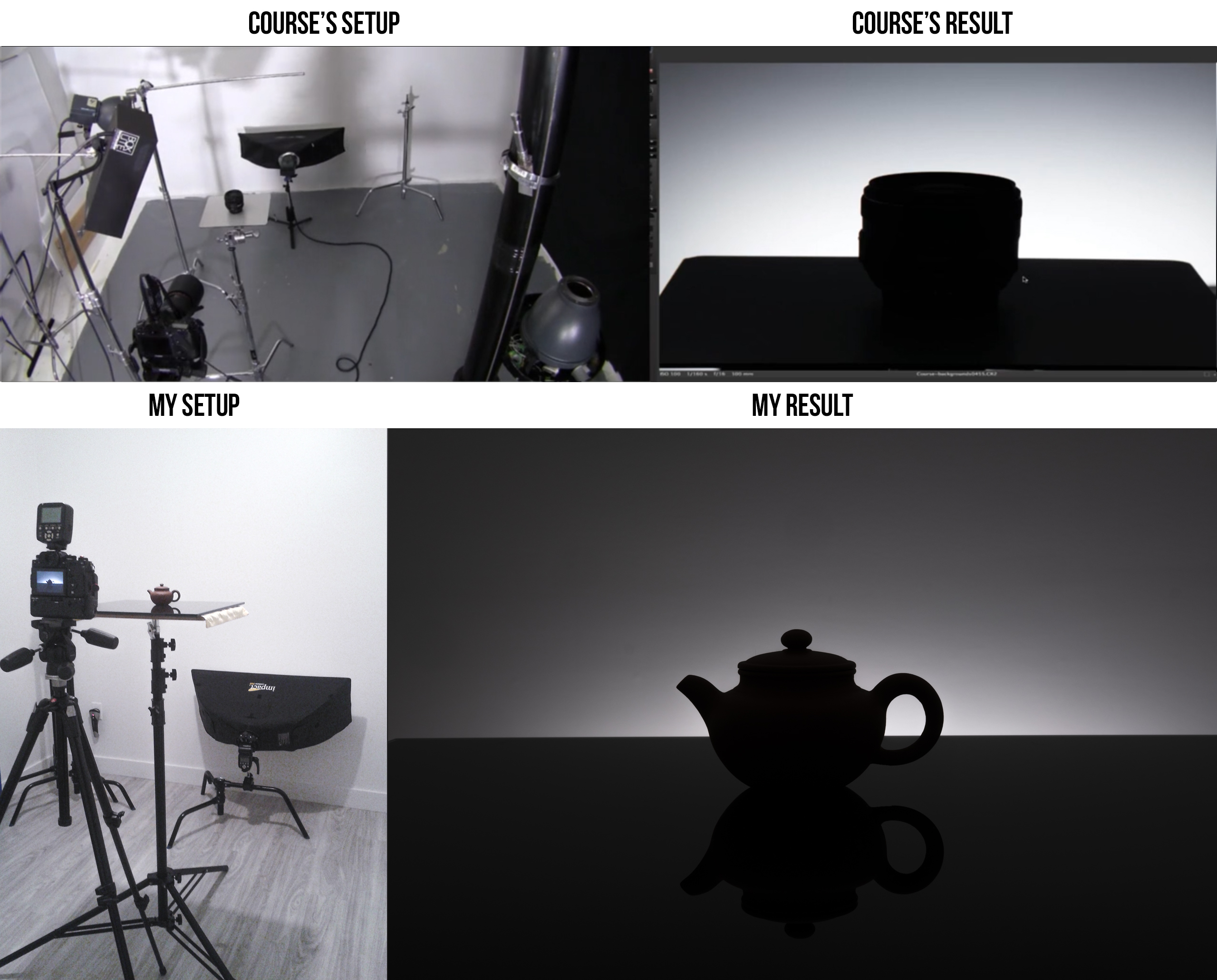
    3.How to create a horizontal gradient without impacting the subject too much (see 3_Horizontal_Gradient.jpeg image)?
    Damn glass, it gets even worse when the horizontal gradient. Look how far the speedlight is from the subject… help
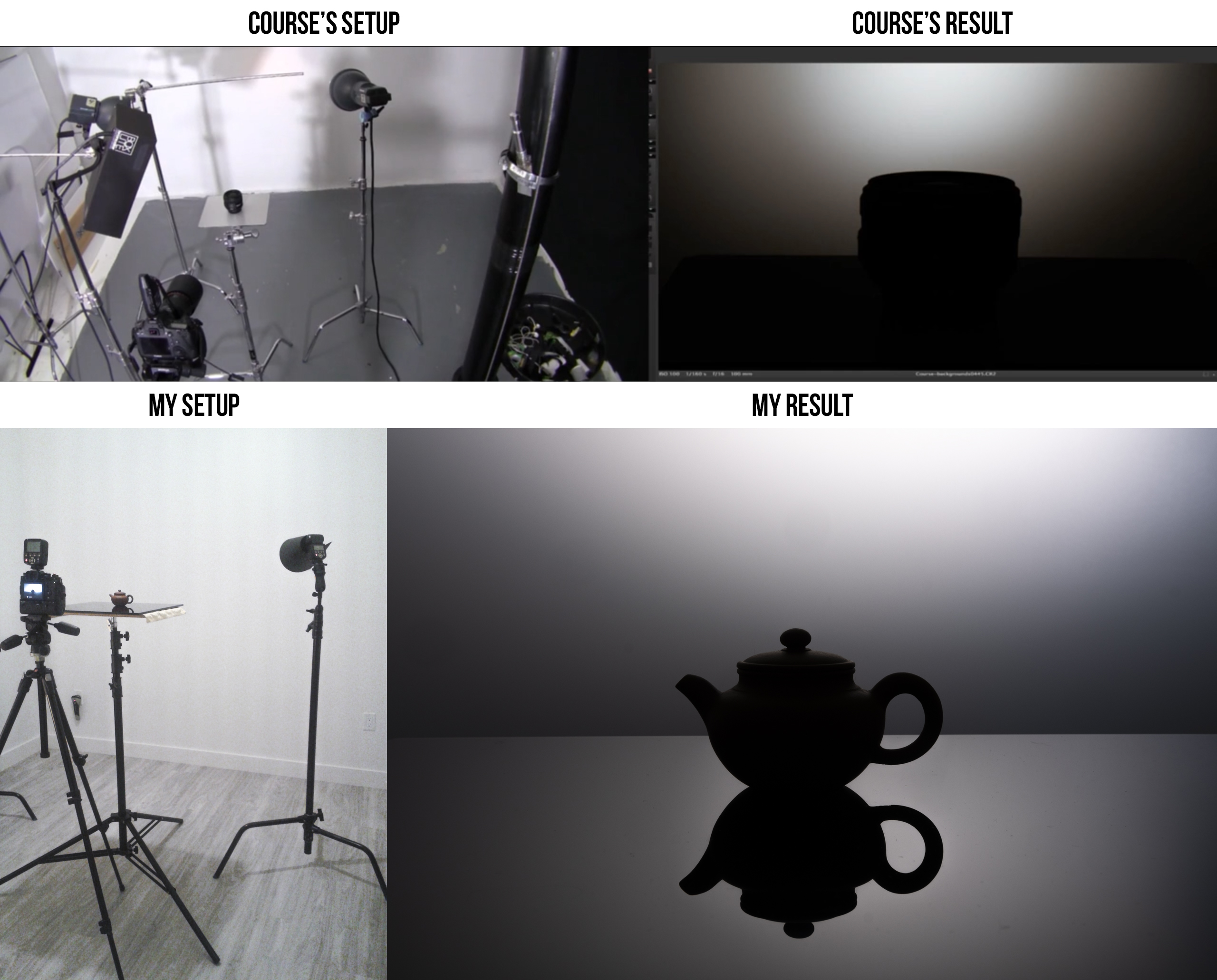
    4.How to create a vertical gradient without impacting the subject too much (see 4_Vertical_Gradient.jpeg image)?
    It’s not that bad…but what can I do to avoid the reflection on the table?

    I grouped these questions together because I guessed the answer may apply to all of them.
    Thanks in advance for your help. Just let me know If I forgot to specify something important. :^)
Viewing 1 reply thread
    • #95605 Reply | Report | Quote
      Brian Ross
      Participant

      Hello Alexandra,

      Maybe I can help.

      1) How to create a silhouette without getting any light on the table (see 1_Silhouette.jpeg image)?

      You can solve this by using the law of reflection: the angle of reflection is equal to the angle of incidence. What’s happening is the camera can see the reflection of the wall spot off the glossy table, so change the angle of either the spot or the camera position, or both. You can test this with a focusable flashlight, look through the camera and use the flashlight on the wall to determine where to place the monolight spot. With the same setup as you have, angle the light lower and perhaps also your camera height and you’ve solved it. You may need to focus your spot a little smaller by moving the light closer to the wall, smaller reflector, snoot, or a smaller cardboard snoot. Look very carefully where the course result spot and camera angle is in relation to the subject.

      2) How to create a reflection on the table while keeping a black background (see 2_Table_Only.jpeg image)?

      Try making a smaller and more focused spot, and keep the law of reflection in mind. Look very carefully where the course result spot is compared to yours.

      3) How to create a horizontal gradient without impacting the subject too much (see 3_Horizontal_Gradient.jpeg image)?

      Try putting the modifier just out of frame, and determine if your ceiling is acting as a reflector shining on your glossy table. Depending on the result, you may need to move your table further away from the wall, use a grid on your strip box, or flag the subject from the side or above.

      4) How to create a vertical gradient without impacting the subject too much (see 4_Vertical_Gradient.jpeg image)?

      I suspect your ceiling is white and fairly low, try to flag above just out of frame. Also test with no strobes and make sure the frame is completely black, if not you’re getting ambient light contributing to your shot.

      I hope this helps!

      - Brian

      • #95741 Reply | Report | Quote

        Even if I checked the box to receive a notification by email, I didn’t get anything when you posted your message. Never late than never, I big thank you for your answer. I am glad I can move to the next topic in my course. ^^

    • #95735 Reply | Report | Quote
      Alex Koloskov
      Keymaster

      Hello Alexandra! Recorded a video for you:

      • #95740 Reply | Report | Quote

        Your explanations were really clear. I can now move forward. Thank you. Alexandra :^)

Viewing 1 reply thread

BACK TO SCHOOL SALE:

Use Code “BACK2SCHOOL”

and get 50% OFF

Sale Ends In:

Days
Hours
Minutes
Seconds

Register FREE for this online workshop with Alex Koloskov and Artem Pissarevskiy