Product photography lighting: It is simple when you know how.

This was our latest assignment, a catalog shoot for Refrigiwear. While doing it I’ve decided to show how proper lighting can make a big difference by using one of the boots from the catalog as an example.

The object I’ve selected is a simple to photograph. Really simple.
Why?
Because it has well visible texture, and does not have highly reflective or transparent surfaces. Nothing similar to this, right?

However, having easy to shoot object does not mean you should not worry about the lighting. It is so easy to do a crappy image just because it looks “nice” as is, with one light source (large softbox will do it). Believe me, I am not against simple lighting schema, but more lights gives me more control over the look of the subject, I just need to make sure to use them right.

Here I am going to show you how each additional light source will change the look of the boot and explain why I need it.

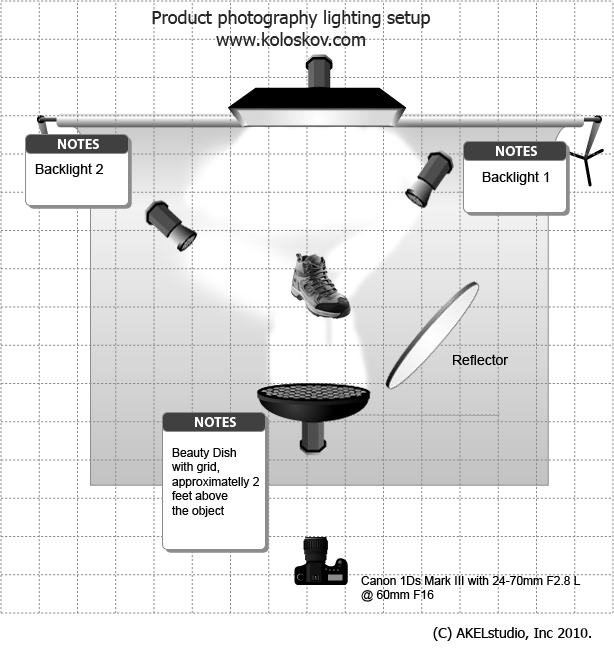
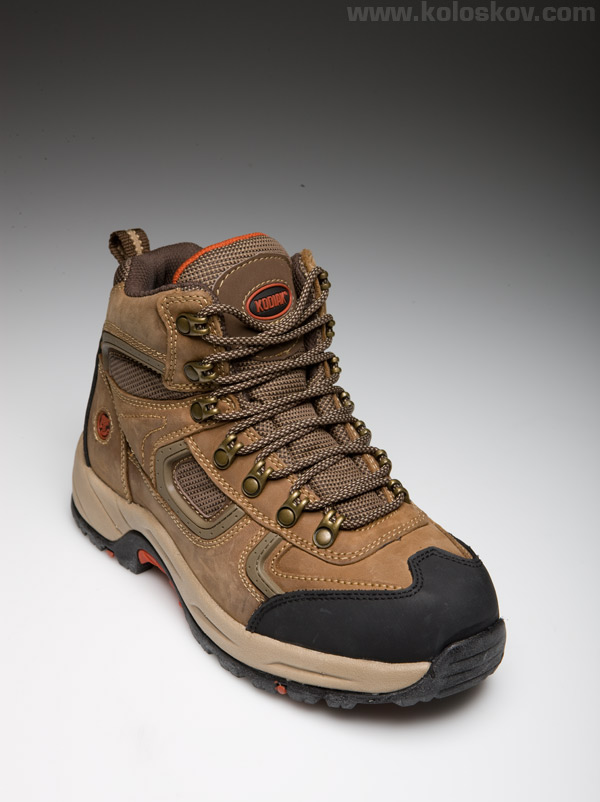
Let’s start from this well textured boot and only one light in front-top of it (White Lightning BD in my case, you can check the lighting setup ):
 

product photography lighting lesson step one

Step one: one light on front/top

It may look good, but not for our catalog, where white background is required. It needs to be completely white (RGB: 255.255.255). We do not clip out the whole object, but use instead a different technique explained here, it allows the shadow  to remain under the boot and is much faster to do.
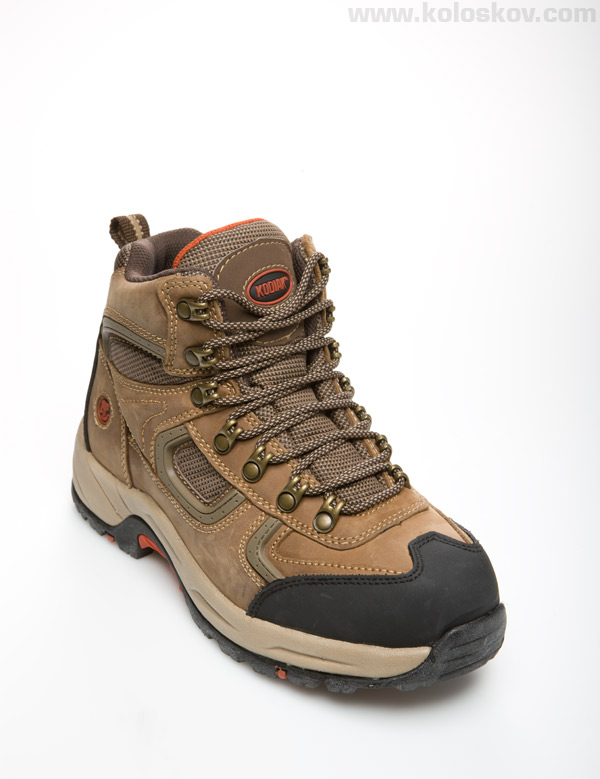
So, one strip box added to fill the background:
product photography lighting setup lesson step two

Step two: background light added


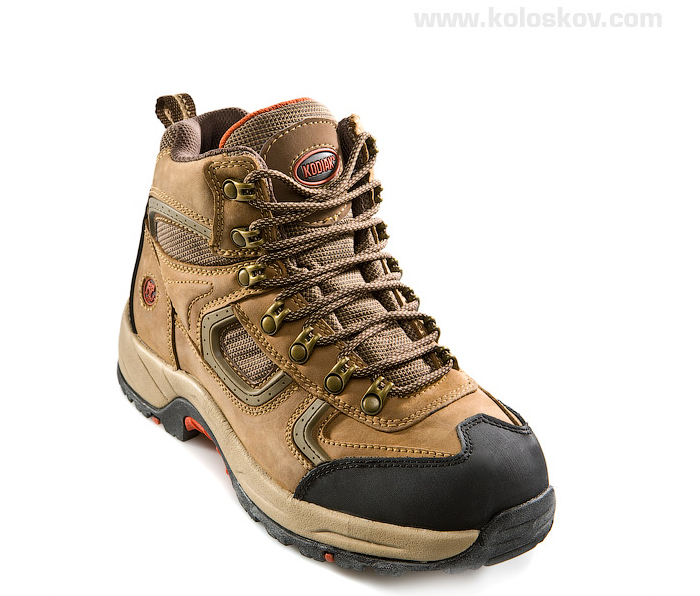
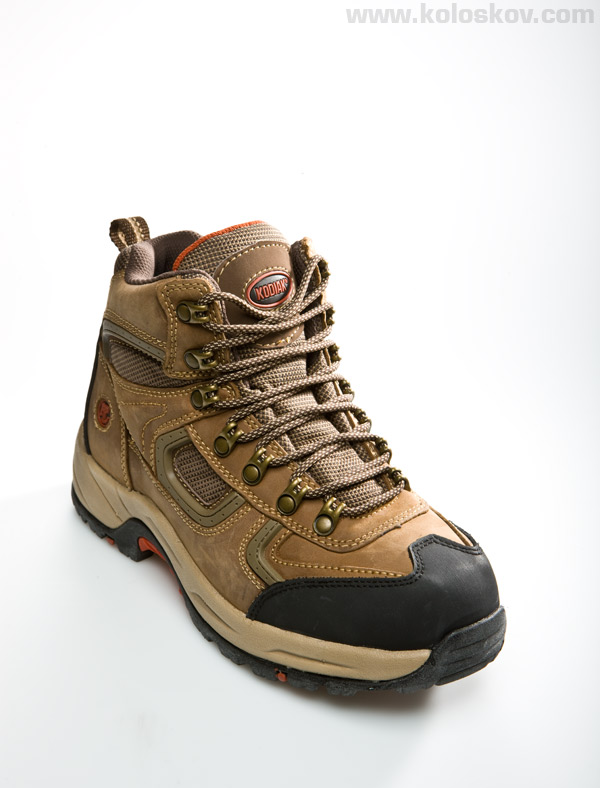
Does not look bad, right? However, it won’t be good for a catalog shoot, as it does not have  clearly visible product details. Now it is time to add some backlight to highlight the texture: intense directional (from 20° honeycomb) light hits boot on a very low angle, from behind (right side) and adds more volume to our boot:
 

product photography lighting lesson step three

Third step: backlight from the right


Now, the last light.
Same spot light (20° honeycomb) was added from behind on the left side, to show the texture on this side of the boot. Additionally, top-front light (BD) was decreased by 1.5 stops (approximately, I do not use flash meter) to compensate additional light source. Now it is more like a fill light.
Background was whitened during post-production as well.
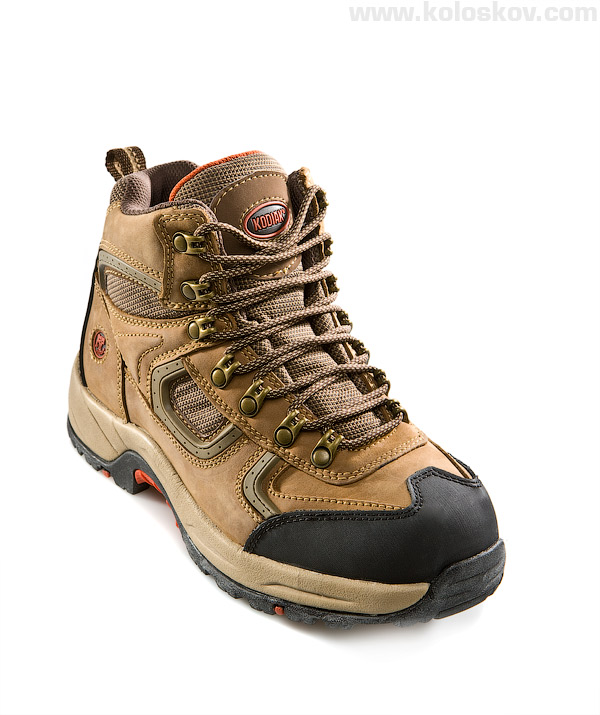
Mouse over to see instant differences between the second and the final one:


product photography lighting lesson final

The final shoot


I know, some may say that the very first shot looks better then the last one… This  may be true if we were talking about individual preferences, each has his own vision. I like it better the way I did it on the last image, plus, there are unwritten standards for the catalog photography which I need to follow to be successful in what I am doing.

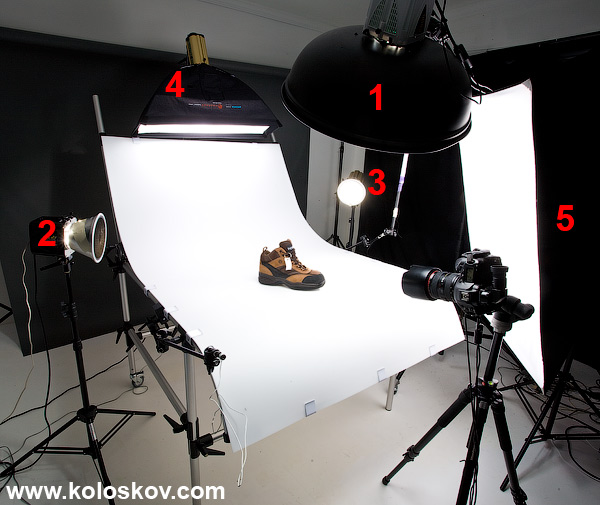
Lighting setup:

product photography lighting setup boot

Lighting setup for the boot

That was shoot for the catalog. Nice, but not quite challenging: regular catalog with products on a white glossy paper. 

This is how I make money these days, but I always wanted to do more creative photography, AD-oriented, much more innovative, edgy, stylish and technically challenging.

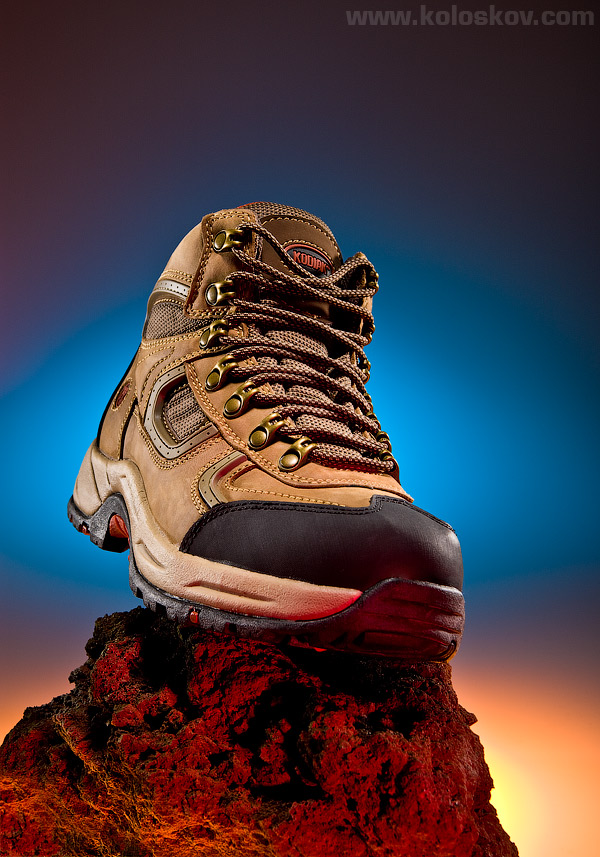
So, why not now? Customer did not ask me to do such shoot, but it will be a good exercise for me to produce something more creative. One additional hour spent in the studio, and here is what we got:
advertisement photography example

advertisement photography example with color gels

I did not use color gels much in my past work, but now I love it! It is like adding additional dimension to a photography, working not only with light and shadow, but with the color for each light source. Interested how it was done?

Here is the setup, you can guess what each light was doing there:
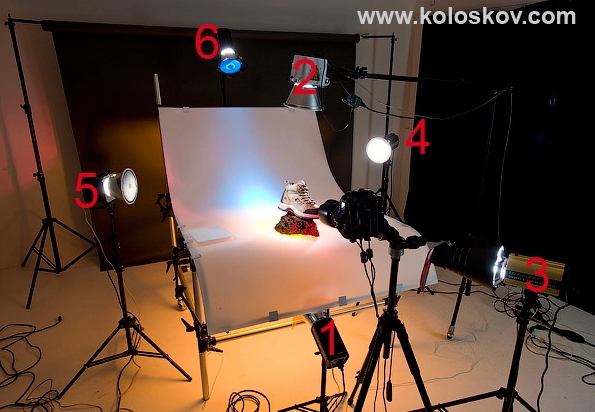
Studio lighting setup using color gels: product photography by Alex Koloskov

Studio lighting setup using color gels: product photography by Alex Koloskov

Equipment and shooting spec:

Shoot Specification:
Camera gear:


Lighting and light modifiers and accessories:

All shots were done with: shutter speed 1/250 sec, F16,  ISO 100, Custom WB 5600K

Hope this will be helpful for some of my readers, would be glad to hear your opinions.
Everyone enjoy shooting nice girls or cute kids or pets… People photography is relatively easy (it terms of the lighting) , as the subjects are very attractive (usually) by themselves, photographer need to capture the beauty. Many great portraits were done wit only one light source: it is the body language, face expression and emotions what makes portrait.   

This is why I like product photography: tasks are usually more technically challenging, competition is less by number but much stronger professionally . I also like to control my subjects by 100%, which is impossible (I am introvert, do not like to talk much:-)  when I shoot people; only a boot will sit silently and keep a pose for me:-)

If you have friends who interested in product photography, please share this article with them, I really want to meet such people here, on this blog.

Thank you!

Be Sociable, Share!

Alex Koloskov

The lighting magician, owner AKELstudio, Inc.

More Posts - Website

Follow Me:
TwitterFacebookGoogle PlusYouTube


Related posts:

65 comments to Product photography lighting: It is simple when you know how.

  • I wonder if you can tell me why you chose the lens you did for the sneaker? I am trying to learn which to use for what. Thanks.

  • JAM

    Aloha,

    I just purchased the same table and am curious as to which side of the plexiglass to use. There is a matte side and a glossy side. Is it just a matter of preference or is there specific side to use??

    Thank you for your help!

    JAM

  • vicky Lynn

    I like to set up a lighting system in my home, so people always look good, how do you do it?

  • Waoo nice picture.i will be waiting for the upcoming pics…

  • I happily stumbled across your blog today. You and I think a lot alike, and that’s rare because I find most photographers tend to be stuck-up and extremely secretive, and you seem to be neither of those things (nor am I). I’ve been shooting since 1995, started my own business in 2006, but only discovered this year that product/commerical photography is my true passion, and I’m committed to becoming great at it. I’ve been online studying and researching, and then putting in to practice things that I’ve read and seen. I’ve been shooting off a flat table, but I want one of those stand “contraptions” like you’re using (which is what I used back in college)- only I cannot even guess as to what they’re called, therefore I don’t know what to shop for. I’ve googled everything trying to figure it out, so I figured I’d just ask you. And is that a large sheet of acrylic, polypropelene, or copolymer or what? How do you keep it from getting loads of scratches, or is it something you replace frequently? Thank you for your time and information!

    Alex Koloskov Reply:

    Alicia,
    I use manfroto shooting table, it comes with that white plexigalss, check this: http://goo.gl/S45h1 (my first in the list)
    You can do something similar with this: http://goo.gl/Hb4I8

    Hope this will help. :-) Good luck!

  • Excellent tutorial, love the contrast you managed to get by using the strong directional light.

    You stated there was backlight from the right, was that shooting through the opaque product table, or bouncing off of it?

    Mark

    Alex Koloskov Reply:

    Mark,
    Backlinks are always good:-)

  • Hey Alex,

    Looking at these images I wonder how hard it would be to pursue photography as a career because I suppose it needs great perfection and a creative mind.

    Alex Koloskov Reply:

    It is not hard if it is your passion:-)

  • Ayesha

    Superb post. Very well explained with examples. Kudos.

    I am a student and writing a thesis on product photography. Though I don’t have much knowledge of various lenses to be used. But the information present here in article and comments are pretty useful to me.
    I read another article Product Photography Tips, which says ‘White Background’ is preferred for product photography. Whats your take on it? Is there any kind of standards defined for product photography?

    Thanks.
    Ayesha

    Alex Koloskov Reply:

    Ayesha,
    There is no standards in photography, at least for me:-) In commercial, the client specifies how they want to see the product (or you can discuss it with client to figure out, if they not sure). As photographer, you have to deliver whatever you agree on.
    White background is a quite common, but it is no a standard .

    I have an article on pixiq.com where I’ve explained technique shooting on white.
    Good luck!

  • ***I don’t think the images went through on my last post.

    Hello,

    First, I have to say that I love the information you provide on your site. Thank you! I am sure it will be something I look at often in the future.

    I have somewhat of a photography nightmare in trying to photograph my sculptures. I create sculptures from found objects including both flat and rounded metal parts of varying reflectiveness. I have been using natural sunlight on my sunporch to shoot product shots for the most part. Not great shots by any means. However, now I am being evicted by the wife so she can use it for our 1 year old daughter (a good reason.) So, I am setting up a makeshift studio in the basement. I just got a pair of Calumet Genesis 200 strobes today that I set at 45 degree angles from the front and have experimented a little with bouncing my 430ex speedlite off a piece of foam core from above, but I am sure there is probably a setup that would work better. Any ideas? I linked a picture below of one of the sculptures so that you could see why I am having problems (of course it would probably be a piece of cake for you!) I need something that will be consistent and show off the pieces for applying to art shows.

    Thanks,

    Brian _MG_4892.JPG

    You can see more (pretty horrible) images at: http://www.flickr.com/photos/adopt-a-bot/

    Brian Marshall Reply:

    One other thing, the background is supposed to be white. Does it look off to you. I shot a picture of just the background and used that to set a custom white balance, but is this as close as I will get and just have to fix the rest in photoshop?

    Thanks again,

    Brian

    Brian Marshall Reply:

    I guess it would help you let you know that I am using a Canon t1i and a canon 60mm 2.8 macro lens. The backdrop is a neutral white and I am shooting through umbrellas that are about 1-2 feet away from the sculpture.

    Alex Koloskov Reply:

    Brain,
    Wow, pretty cool sculpture i must say:-)
    As for the lighting, try to use diffuser and uneven (more from one side less from another) lighting, it will add a volume to your image. Diffuser can be placed the way it will be reflected on some of the sculpture.. and then you create a gradient on that diffuser, which will be “translated’ to the subject.
    Currently your lighting is too “flat”

    It is hard for me to explain, but easier to show.. come to our class :-)

    Brian Marshall Reply:

    I actually looked at something else you did with brushes and totally get what you are talking about. I will try some different things and see what happens.

    Thanks!

    Brian

    Brian Marshall Reply:

    @Brian Marshall, photostream

    Well, I switched to a black roll of paper and played with the angle of the lights a little bit. What do you think? Any better?

    Brian Marshall Reply:

    @Brian Marshall, sinclair%2B-%2Bfound%2Bobject%2Brobot%2Bassemblage%2Bsculpture%2Bby%2Bbrian%2Bmarshall.jpg

    Brian Marshall Reply:

    @Brian Marshall, Magnus%2B-%2Bfound%2Bobject%2Brobot%2Bassemblage%2Bsculpture%2Bby%2Bbrian%2Bmarshall.jpg

  • Hello,

    First, I have to say that I love the information you provide on your site. Thank you! I am sure it will be something I look at often in the future.

    I have somewhat of a photography nightmare in trying to photograph my sculptures. I create sculptures from found objects including both flat and rounded metal parts of varying reflectiveness. I have been using natural sunlight on my sunporch to shoot product shots for the most part. Not great shots by any means. However, now I am being evicted by the wife so she can use it for our 1 year old daughter (a good reason.) So, I am setting up a makeshift studio in the basement. I just got a pair of Calumet Genesis 200 strobes today that I set at 45 degree angles from the front and have experimented a little with bouncing my 430ex speedlite off a piece of foam core from above, but I am sure there is probably a setup that would work better. Any ideas? I linked a picture below of one of the sculptures so that you could see why I am having problems (of course it would probably be a piece of cake for you!) I need something that will be consistent and show off the pieces for applying to art shows.

    Thanks,

    Brian

    photostream

  • hello alex your work is awesome and it inspired me alot :)
    i am trying to achieve some good results as i have just started photography as a hobby dont have any lights and reflectors i use only paper sheets with a DIY Lamp :)
    i get into problem when i cramp up my aperture to f20 or f15 the image get dark and dull and if i increase shutter speed i dont get that fine and smooth look in my images at all
    i tried in the following images below tell me how am i doing till now
    i have a cannon 550 D with 18 – 135mm f3.5 lens

    http://3.bp.blogspot.com/-WE_qn-U5DuE/TjAcUv8QeoI/AAAAAAAAAB0/iq2xnhcKcKo/s1600/IMG_1944.JPG

    kinldy check
    http://www.shariqmajeed.blogspot.com
    for more images :)

    Alex Koloskov Reply:

    Shariq,
    You have a good eye, i see lot of potential in your work. Please keep going!
    As for the image quality: the lens you have is not as sharp as L class, and at high apertures situation gets even worse. Diffraction kills the contrast and clarity, and there is nothing you can do about it for that particular lens.
    You can try to gain sharpness back when preparing image for web by playing with different sharpening algorithms. But the best way is to shoot on f10 and do a focus stacking.. I have a good tutorial about focus stacking here on the blog.

    Wish you good luck!

    shariq Reply:

    @Alex Koloskov, thank you alex for the guidance i will try focus staking and will change my lens :)

  • Thanks for posting things like this. It always amazes me to see all the details behind what you shoot.

  • biswanath

    very nice photography.Hallo sir I am Biswanath a cine-still photographer.how can I a good product photographer? SIR I want to be a commercial photographer. will u please give me some tips I shall be obliged to u.

  • Great article, very interesting to see how others set their shots up! Thanks

  • Beautiful work – I’m not a photographer but after seeing your work, I’m sure inspired to learn – thank you. Brent M

  • Jane

    Thanks Alex for this very informative blog, I have been searching for several hours on google for decent information on product photography and lighting but have only found endless DIY and cheap set ups. I’m doing an online photography course and the current assignment is asking me to detail the equipment I would need for a chosen style of photography and explain why I selected it. I’m steering towards product/still life but there seems such a vast amount of lights and brands being used and also varied set ups. I currently have similar lights (beginner set) to what Adrian has, with silver reflective and white diffusing umbrellas. It was enlightening to see how you have used lights in this blog and the video clip on you tube with the make up brush to ‘see’ the difference and effects in the results with altering lights. Thank you – very helpful indeed.
    Jane

    Alex Koloskov Reply:

    Thank you, Jane.
    Glad you found it helpful.
    I was doing the same research 5 years ago, while trying to find something useful for a product photographer, and couldn’t find anything. This is how I came with idea of my blog: if I’ll learn something, I’ll better share it:-)
    Can only hope that more fellow photographers will know about my blog: I really want to meet like-minded people here, those who do not afraid to give more then take.

    All the best!
    Alex

  • Dear Alex,
    happy to meet such a generous photographer as you are.
    You’re great.
    Take care of you.
    Corinne

  • Wow lots of honeycombs for this one, gives it a dramatic look!

  • Adrian

    Great article, thanks for taking the time to share the info.
    I’m just learning about product photography, and for anyone else on a budget or wondering about lights versus post-processing – Alex is right: if you can do it with light and get it right, it will _really_ be worth it.

    As I can’t spend the $$$ on ‘proper’ lighting right now, I’ve been experimenting with low-energy daylight balanced bulbs and got some good results – a 30W bulb will produce clean bright light equivalent to a 150W traditional bulb. They’re cheap, don’t get too hot and if you have a camera where you can dial in a colour temperature (like my Nikon D200) it makes life pretty straight-forward (if you’re using a good solid tripod). For stuff that’s not moving, arranging 4 or 5 of these in a similar way to Alex’s set-up (I use angle poises on chairs/tables!) can work.

    Haven’t experimented with filters/gels yet, but I notice Strobist has done a deal with Rosco which some of your readers might find useful – http://www.rosco.com/us/video/strobist.cfm for the US or http://www.rosco.com/uk/video/strobist.cfm for the UK – for using with flashguns.

    For reflectors I’ve used the silver-coated polystyrene sheets that go behind household radiators; shiny crepe paper (silver or gold) and soon I’ll experiment with camping survival/space blankets.

    My background rolls and light tent/diffusers are a bit unusual – I use a ‘cloth’ that comes from a factory that makes paper for teabags! This is quite light-reflective, but also semi-translucent, so I can shine lights onto it, or through from behind, or even below – I’ve rigged up a trestle table with very cheap perspex (the kind you use for DIY secondary glazing, or in cheap greenhouses) – two sheets, with a sheet of my ‘teabag paper’ sandwiched between them. This lets me shine a light up from below to give a ‘halo’ around an object, and at the same my other side/down lights give me a faint reflection in the perspex (a bit like your pen shots (http://www.photigy.com/product-photography-shooting-hi-end-pens-with-lighting-setup-and-how-to-do-tricks/) but all in-camera.

    The biggest problem is my Springer Spaniel, who always wants to come and lie down in the warm cosy ‘tent’!

    Great blog, glad to have discovered it – and I am completely with you on this point – drive the Honda, earn the $$ for the Bentley, or maybe a hybrid EV :)

    Adrian

    Alex Koloskov Reply:

    Adrian,
    Those fluorescent lights you are talking about are great tool to learn the lights, as it is much easier to see what is going on on a stage. One big disadvantage is that you can’t adjust it’s brightness (I guess only 50-100-150Wt adj is possible) , so you have to manipulate with the light modifiers and distance to a subject to dial the lights.
    Good option could be screw-in LED lights: consistent color temp, easy to dial power (if supported by fixture), huge light power.

    BTW, did you get a website/portfolio? It would be interesting to see your work, plus, to have a do-follow link form my blog to your portfolio should be a good thing to have:-)

    Interesting teabag background, do you buy it somewhere, or just have an “unofficial” source of it? I would be curious to try it.

    Thanks for the comment!

    Alex

    Adrian Reply:

    Alex, you’re right, adjusting levels is much more effort than with proper lights, but do-able.

    I like the idea of the LEDs you mention – as it happens I found this earlier today http://www.youtube.com/watch?v=5iWPmcPeVM4, and this guy also uses them – http://www.youtube.com/watch?v=_G8I-LZohZE. What I haven’t figured out is how they are controlled?

    The ‘tea’ paper is an industrial product made by a company called Ahlstrom – http://www.ahlstrom.com – I happened to be shooting in their plant near me, spotted these rolls and they were kind enough to let me have some :)

    With “39 manufacturing sites in 14 countries”, maybe there’s one near you!

    Adrian

    PS – website is coming, will let you know.

    Alex Koloskov Reply:

    Adrian,
    The guy on those video is using some architectural strobes (have no idea what is that), but no the LED I was talking about.
    Here some of them on BH: LED lighting Kits
    Or, you can DIY using such LED panels: LED Panel. You may need to use potentiometer to make it adjustable.

    Thanks for the link, not sure if they sell them by rolls. Translucent reflectors will do the same thing form me:-)
    Website: great! please, please do not do it with small images: the worst way to represent your work on 1900×1200 monitor is to have it 600×400 pixels, IMO :-) )

  • Zuzana

    First, I enjoy your work and I am very happy your sharing how you do things. I am starting to create my own work and will post a website soon.
    Second, The shoe image is really good. I agree that the gels add that umpf to the picture. I would pull the toung of the shoe out a little and twist it just a bit so the logo is more pronounced.
    KEEP UP THE AMAZING WORK!

    Alex Koloskov Reply:

    Zuzana,
    Thank you, appreciate your comment.

  • Gabi,
    I do agree with you on some of your statements, but do not on the others.
    I do agree that shooting people has it’s own challenges, different then in product photography: moving objects, kids (they are hardest, I know :-) , lights can be tricky, etc. You are right: you have to know how to bring the beauty of the regular person, same challenge probably to make regular product look sexy:-) Unless you shoot a celebrity, but this type of photography has it’s own challenges. But in my experience, there is no way I can spend 2-3 hours to get done 1 single portrait.. And I can easily spent tat time shooting some tricky reflective kitchenware. Is it only me having such experience?

    I do not agree with you about post processing and top-notch lighting: You can’t fix everything in a post processing without certain quality degradation, usually a noise and/or loss of details. Another words, if you’ll try to make the same image as I’ve got as a final form a first one (single light), you’ll won’t get the same result. I know the limitation of a post-processing (not talking about post-production, where you can spend several hours or days “fixing” the image, and result will be much better, as you can re-draw the whole thing by hand). Shooting a products meaning you shoot hundreds of them. Nobody will pay you for a such extensive post-production.

    Much easier to get it done right with the lights. Now, about the lights: I use a least expensive professional lights on a market, Alien Bees and White Lightning. They cost 25 times less then ProPhoto or Broncolor, ($400 for each monolight v.s $9000 for generator plus $1000 for each head). My lighting setup is what I have top-notch here :-) Lights is really nothing, for such photography I can do the same with these $35 lighs.

    Thank you,
    Alex

  • Gabi

    While I like your result, I have two reservations: First of all I don’t agree with your notion that people photography is easy – particularly children. People move, blink, look inhibited in front of cameras, are hard to satisfy because they don’t like the way they look (even if they look good), and, as you say, you have to have the right personality to bring out the best in them. Also, light can be important here too. Second, I am not sure how much of your final result could have been achieved with post-processing just the same (instead of investing in top-notch lighting gear). Sure, it pays off when you do a lot of product shots and can basically use the same setup for all items in a certain series. But if you just do the occasional product, it might save you a lot of money to learn post-processing.

  • Salman

    Thanks for reply

    The lens you have used ( canon 24-70 f2.8L ) in this shoot is very expensive for me as i m not a pro photographer but i can spend on Sigma 24-70mm F2.8 IF EX DG HSM as it is less expensive. do you think this lens can produce same results as Canon L ?

    Alex Koloskov Reply:

    @Salman,
    I am 100% sure the your lens will be fine. The difference in a sharpness or contrast won’t be much noticeable, especially if you adjust the final image correctly during a post processing. Expensive lens pays you back when you shoot a lot, saving on a post-processing.
    BTW, the lens you’ve got is not bad at all, I still use my old Sigma 105mm F2.8 macro for commercial work occasionally, works good, when I use it properly:-)

    Salman Reply:

    @Alex Koloskov, Thanks for reply, You saved lot of my money

  • Thanks for another very interesting and informative article

    can you please advise that the less expensive cameras like 500d can produce same great results like sharpness, colors etc

    Thanks

    Alex Koloskov Reply:

    @Salman,
    Sure they can. Lens, not a camera is responsible for a sharpness, color, etc
    See my other article about cameras:
    Buying guide

  • Beautiful !
    Ilove the packshot with the blue background.
    Your article is very well presented with plenty of examples.
    You raised a very important point too. If the client says he wants a white background. Then white it should be.
    I look forward to reading more like this.
    regards
    Steven Kettle

  • Thank you so much for sharing these techniques. I also like the fact that you use White Lighting, when many pros fine pro foto kits the only way to go.. and a very expensive way to go as well.

    Alex Koloskov Reply:

    @cheryl,
    I found that equipment does not play a major part of the photography, but the experience does. In most cases the same photo-work can be done using less expensive gear. It is like in a car’s world: you can do the same trip to Las Vegas on Honda or on Bentley… Only your own experience will be different, not the result.
    However, Prophoto or Broncolor may be the only capable of producing the result in case if the task is very specific: like hi-speed liquid photography, where flash duration plays a big role.. But for the rest, less expensive lights would work just fine.

    When you get money, buy Bentley.. How to get money? Use Honda:-)

    Thank you!

  • Thanks so much for this info – this is hard to come by as an outsider!

  • parv

    “Backlight 1″ is not working for me as it is obscuring the details, compared to first two versions. Now “backlight 2″ looks both better balanced & a good addition.

    The shoe, in color gel version, looks like as if being worn by an invisible being. Was that intentional? Like the orange/red color on the rock. The yellow color below seems a bit too much. How was the background without the yellow light?

    Alex Koloskov Reply:

    @parv,

    I understand you, each has his own vision. This is why photography world is so attractive to may of us, right? :-)
    The boot in a color version was placed the way like it would be if someone will step up on that rock, you are right. And the yellow color: it was an orange from the under the table, it gets de-colored in the middle because it more intense there.

    Ok, to make it easier to see, I’ll post the setup for that colored one, here it is:

    lighting-setup-color-gels-in-product-photography.jpg

    Numbers:
    One is orange
    Three is red
    Two, Four and Five are white (to a boot)
    Six is Blue.

    The idea was to show the boot between two opposite environments: hot like a lava rock and cold blue… The manufacture making them for a guys who work in a warehouse freezers… I’ve added the lava rock:-)
    Thank you!

    parv Reply:

    Alex, I mentioned “backlight 1″ as I could not see how it “highlight[ed] the texture” & “add[ed] more volume”.

    “I understand you, each has his own vision. This is why photography world is so attractive to may of us, right?” — indeed. I did think that my opinion would come out a bit strong. Then again, if (I) had not expressed as such, I/we would not have known the reason of set up of the last image. I appreciate the set up images.

    I personally need to learn much about product photography, food photography, event …

    Thanks Alex.

  • Dave

    Thanks for the great article, Alex. I found your blog from PHOTO.NET. My daughter is doing a lot of pottery in school and I want to document it. I haven’t done a lot of product photography, so your article is a great tutorial for me.

    One side note. I’m viewing this page using Firefox browser and it has AdBlock to block popups and banner ads. It also blocked your final product shot because it had the word ‘advertisement’ in the name of the image file. I thought I’d mention it for others who can’t see the final shot. Turn of your ad blocking software.

    Alex Koloskov Reply:

    @Dave, Thank you, glad you found it interesting.

    Regarding Ads: I understand why colored boot has an issues with the software, but the rest.. Very strange, as I do not have any Ads nor banners on the blog.. Must be something else: if you used a link from other sites they may run some Ads in the iFarme or something like this..

    Dave Reply:

    @Alex Koloskov, The file name has the word “Advertisement” in it: “advertisement-photography-example-by-alex-koloskov.jpg”. One of the AdBlock filters is to block any image with ‘advertisement’ as part of the file name. AdBlock is a common add-on for Firefox. I’m mentioning it for anyone else who is using Firefox and can’t see the image. It’s probably their AdBlock filter. Just disable it temporarily and the image appears.

  • Thank-you for your VERY informative articles… Great for any of us newbies reading you :-)

    Have you any suggestions for producing clean shots of parchment-paper documents (not exactly scrolls but flat 18th century doucments) for a catalogue?

    I tried shooting on a green bristol-board and pressing a large glass panelfly overadapted the product to flatten it. I thought i could use a greenscreening approach to ensure I preserve the exactly paper-edge characteritics in a semi-automated backgrounds removal process. Not obvious if this is a good idea. Also the green is coming through the skin-parchment paper colour-casting it :-(

    I’ve got my camera (d200.. Sorry to you canon users.. Forgive me!) on a tripod pointing straight down and I,ve set a lightbox and refector opposite to each other and outside the 45degree angle to avoid a directly bounce. Any other ideas?

    How would y o u go about producing archive shots for a catalogue involing 200-300 documents?
    Btw… To do the wax seals and tiny paper imprints I’m using a macros lense but for the rest I was just using my 50mm/1.8 set to f11.

    Thanks for any thoughts on the matter.

    Shawn

    Alex Koloskov Reply:

    @Shawn,

    I never did document or art photography before, so I can only guess.. What you said about setup sounds right thing to do, I’ll do the same. You can play with the angle of lights though: When you lower them to something like 20 degree angle instead of 45 it may show better texture of the document, if you need to show it.

    As for a green chroma-key.. Not sure if it will work, as (how I understand it) green should be far away from the object to avoid any color casting on it.. BTW, why do you need that green? I guess Photoshop may do background work better. If you want, you can send me your setup and the final, desired result photo (it hard for me to see the whole picture), may be I will be able to give you a hint or two…

    In any case, good luck, must be an interesting project:-)
    Thank you.

  • Alex,
    Nice…simple is usually better. :)

    Cheers from San Francisco!
    ~Larry

    Alex Koloskov Reply:

    @Larry,
    Yep! :-)
    Thank you.

  • Janis

    Why don’t you share this will us on strobox where you can put both photos and diagrams on!

    Alex Koloskov Reply:

    Because you have not finished your website yet, this is the reason I’ve removed the link from your comment. Good idea, BTW get all done and let me know: all put links back.

  • I’m not a photographer but after seeing your work, I wanna be one.:)

    Alex Koloskov Reply:

    :-) Thank you, Tatyana!

  • Vicki

    Great article. Saw the link to in through the LinkedIn group Canon EOS Digital Photography. I also like doing product photography and still life photography.

    Alex Koloskov Reply:

    Thank you, Vicki!

Leave a Reply